
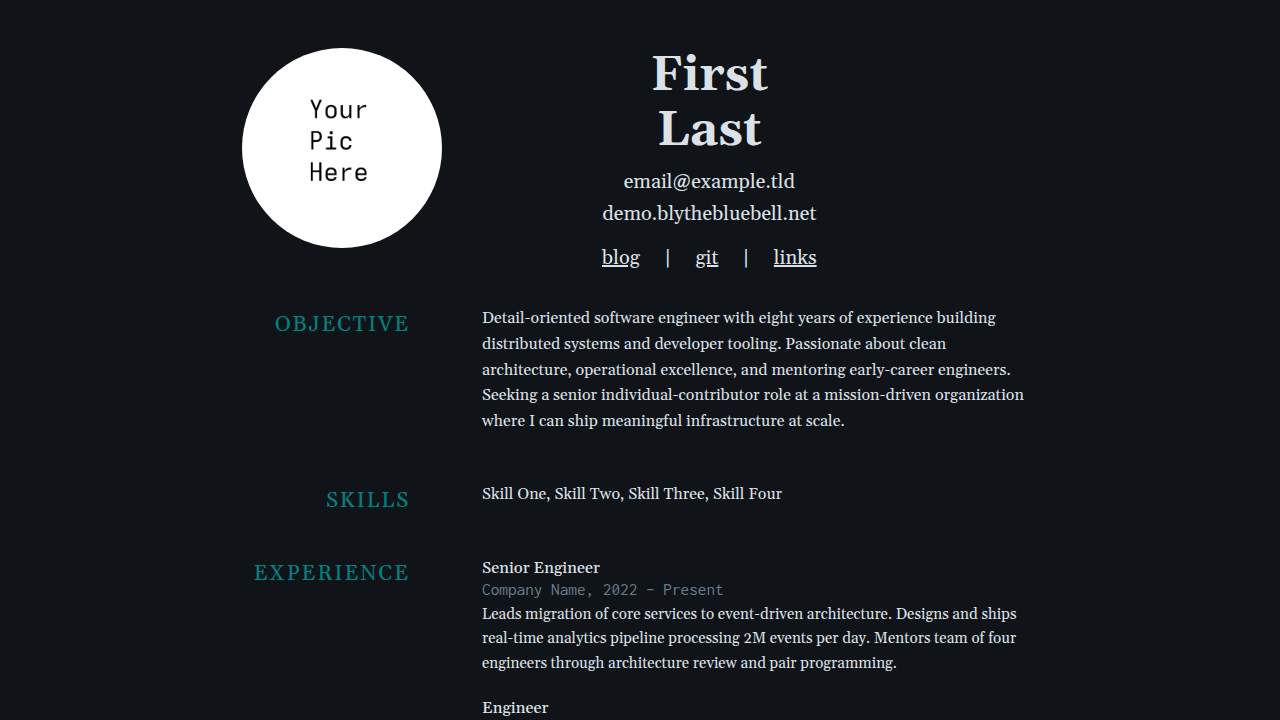
A dark minimal resume theme for Zola with old-school Microsoft Word formatting, Gelasio serif and Inconsolata mono fonts, and inner pages for blog and links.
zola.toml// knob: tuning commentsRequires Zola 0.23.4 or later; this demo is validated with 0.23.4.
From your Zola site's root, add the theme as a Git submodule:
git submodule add https://git.colorized.life/demo.blythebluebell.net.git themes/blytheAlternatively, clone it into the same directory:
git clone https://git.colorized.life/demo.blythebluebell.net.git themes/blytheSet the top-level theme = "blythe" in your site's zola.toml, as shown below.
The repository itself is a standalone demo: run zola serve from its root to preview it. For a consumer site, create your own content and replace static/profile.jpg with your portrait; the theme includes a demo portrait and fonts. Create pages for navigation destinations you retain, or override the link arrays.
Minimal consumer zola.toml (independent of the branded demo):
base_url = "https://example.com"
title = "My Site"
theme = "blythe"
compile_sass = true
build_search_index = false

[extra]
site_title = "My Site"
copyright_holder = "Your Name"
footer_links = []

[extra.resume]
first_name = "Your"
last_name = "Name"
nav_links = []
Create content/_index.md with an empty +++ TOML front matter block to establish your home section. Theme resume defaults supply sample contact, objective, and skills; replace them for your site.
The following block exactly reproduces the active [extra] defaults in theme.toml:
[extra]
site_title = "My Site"
copyright_holder = "Your Name"
footer_links = [{ name = "acknowledgements", path = "/acknowledgements" }]

# Footer links use a simple schema: { name, path }
#   name    — display text
#   path    — local path or absolute URL (e.g. "https://example.com")

[extra.resume]
first_name = "First"
last_name = "Last"
contact = [
  { text = "email@example.com", url = "mailto:email@example.com" },
  { text = "example.com", url = "https://example.com" },
]
objective = "Old-school profile statement describing goals. Two sentences maximum."
skills = ["Skill One", "Skill Two", "Skill Three", "Skill Four"]

nav_links = [
  { name = "blog", path = "/blog" },
  { name = "git", path = "/git" },
  { name = "links", path = "/links" },
]
site_title is the homepage heading fallback when resume.first_name is absent. A configured first/last name takes priority and keeps the split-name layout. config.title controls browser titles. The theme supplies sample names by default.
copyright_holder defaults to Your Name; without that setting the template falls back to config.title. Optional copyright_url is omitted from theme defaults and falls back to config.base_url.
Footer links accept { name, path }; path may be a local path or an absolute URL. Footer links do not consume url. Resume navigation accepts { name, path } or { name, url }, with url taking priority. Contact entries use text and an optional url; omitting it renders plain text. Link-page entries use name, url, and description.
Optional feed_path adds a footer Atom link by appending /atom.xml. For /blog/atom.xml, set feed_path = "/blog" without a trailing slash, configure top-level feed_filenames = ["atom.xml"], and enable generate_feeds = true in the blog section front matter.
| Route | Template | Description |
|---|---|---|
/ | index.html | Resume landing page |
/blog | blog.html | Paginated blog listing |
/blog/* | post.html | Individual blog post |
/links | links.html | External links (header nav) |
/sites | links.html | Cross-site family navigation (footer) |
/palette | palette.html | Color palette reference |
/acknowledgements | page.html | Font and tool credits |
The following snippets are separate consumer customizations; merge tables into your existing configuration rather than repeating TOML table declarations.
Consumer customization in zola.toml (create the linked pages and blog feed):
[extra]
copyright_url = "https://example.com"
feed_path = "/blog"
footer_links = [
  { name = "home", path = "/" },
  { name = "sites", path = "/sites" },
]
Branded demo configuration excerpt, preserving its source link's position in the footer:
[extra]
footer_links = [
  { name = "home", path = "/" },
  { name = "source", path = "https://git.colorized.life/demo.blythebluebell.net/about/" },
  { name = "palette", path = "/palette" },
  { name = "acknowledgements", path = "/acknowledgements" },
  { name = "sites", path = "/sites" },
]
The source path is an absolute repository URL and works without a deployment redirect.
Consumer header, navigation, and body customization in zola.toml:
[extra.resume]
first_name = "Your"
last_name = "Name"
contact = [
  { text = "email@example.com", url = "mailto:email@example.com" },
  { text = "example.com", url = "https://example.com" },
]
nav_links = [
  { name = "blog", path = "/blog" },
  { name = "git", url = "https://example.com" },
  { name = "links", path = "/links" },
]
objective = "Profile statement describing goals."
skills = ["Skill One", "Skill Two", "Skill Three"]

[[extra.resume.experience]]
company = "Company Name"
positions = [
  { title = "Senior Engineer", start = "2022", end = "Present", description = "Description paragraph." },
]

[[extra.resume.education]]
degree = "B.S. Computer Science"
school = "University Name"
year = "2016"
Body sections render when their corresponding fields are present. Experience positions consume title, start, end, and optional description; each job supplies company. Education entries consume degree, school, and year.
Consumer page front matter example for content/links.md:
+++
title = "Links"
template = "links.html"

[[extra.links]]
name = "example.com"
url = "https://example.com"
description = "Description text"
+++Consumer color customization in zola.toml (shown values are the existing palette):
[extra.colors]
bg = "#101418"
text = "#dce1e8"
muted = "#6b7d8d"
accent = "#551a8b"
glow = "#018281"
Only specified colors override the Sass defaults.
| Key | Default | Role |
|---|---|---|
bg | #101418 | Page background (Midnight Office) |
text | #dce1e8 | Primary text (Paper Grey) |
muted | #6b7d8d | Metadata, descriptions (Cubicle Grey) |
accent | #551a8b | Link hover (American Violet) |
glow | #018281 | Section headers (Windows 95 Desktop) |
Optional [extra.palette_names] and [extra.palette_roles] accept the same five keys and change palette-page swatch labels and roles. Omitted values use the theme's built-in labels. Consumer customization example:
[extra.palette_names]
bg = "Night"

[extra.palette_roles]
bg = "Page background"
Sass files also include // knob: comments for layout tuning.
MIT; see LICENSE.