
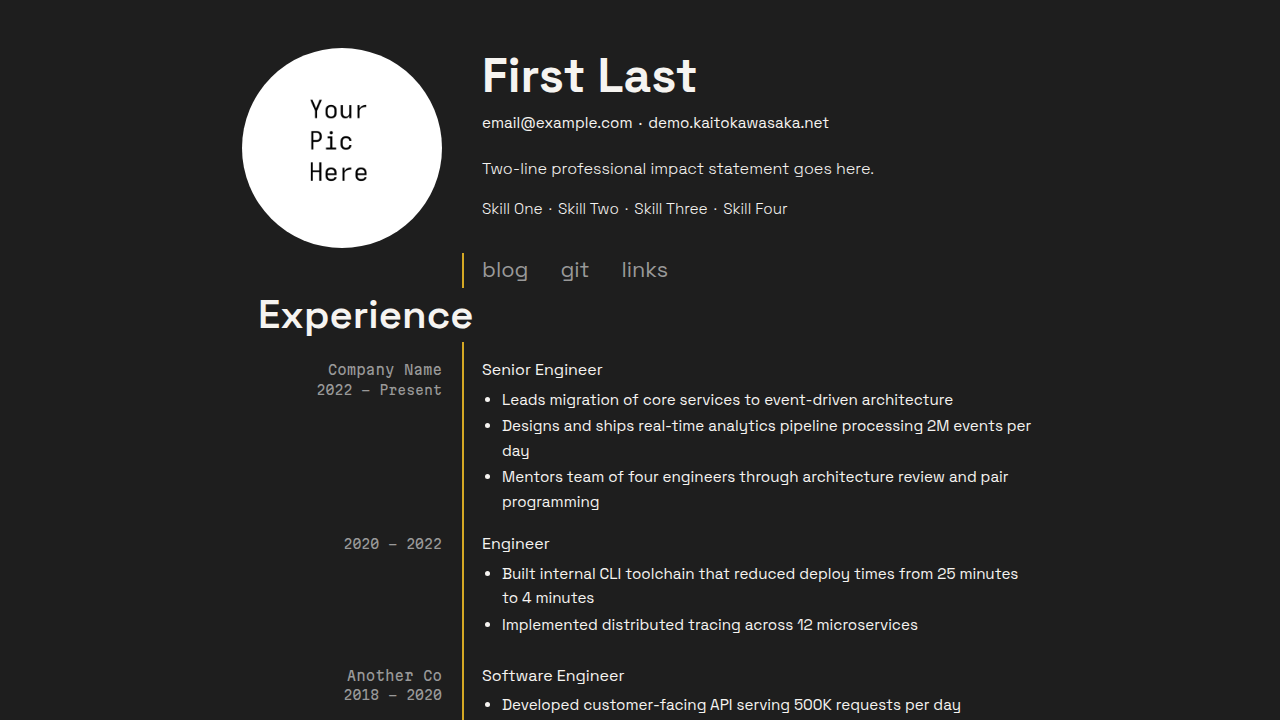
A modern dark resume theme for Zola that doubles as a personal website landing page, with inner pages for blog and links.
zola.tomlRequires Zola 0.23.4 or later; this demo is validated with 0.23.4.
From your Zola site's root, add the theme as a Git submodule:
git submodule add https://git.colorized.life/demo.kaitokawasaka.net.git themes/kaitoAlternatively, clone it into the same directory:
git clone https://git.colorized.life/demo.kaitokawasaka.net.git themes/kaitoSet the top-level theme = "kaito" in your site's zola.toml, as shown below.
Minimal consumer configuration for your site's zola.toml:
base_url = "https://example.com"
title = "My Site"
theme = "kaito"
compile_sass = true
build_search_index = false

[extra]
site_title = "My Site"
copyright_holder = "Your Name"
footer_links = []

[extra.resume]
name = "Your Name"
nav_links = []
The homepage always renders a profile image. Add your portrait at static/profile.jpg. Create your own content under
content/; the demo's content is not installed as your site's content.
Empty navigation arrays avoid links to pages you have not created yet.
Run zola serve to preview and zola build for production output.
These are the active theme defaults from theme.toml:
[extra]
site_title = "My Site"
copyright_holder = "Your Name"
footer_links = [{ name = "acknowledgements", path = "/acknowledgements" }]

# Footer links use a simple schema: { name, path }
#   name    — display text
#   path    — local path or absolute URL (e.g. "/about", "https://example.com")

[extra.resume]
name = "First Last"
contact = [
  { text = "email@example.com", url = "mailto:email@example.com" },
  { text = "example.com", url = "https://example.com" },
]
summary = "Two-line professional impact statement goes here."
skills = ["Skill One", "Skill Two", "Skill Three", "Skill Four"]

nav_links = [
  { name = "blog", path = "/blog" },
  { name = "git", url = "https://example.com" },
  { name = "links", path = "/links" },
]

# Nav links use { name, path } for local or { name, url } for external links.| Key | Theme default / fallback | Description |
|---|---|---|
site_title | My Site | Homepage heading when resume.name is absent; final template fallback is My Site |
copyright_holder | Your Name; template fallback config.title | Footer copyright text |
copyright_url | Unset; falls back to config.base_url | Optional copyright destination |
footer_links | Acknowledgements link above | Entries use name and path; path accepts local paths and absolute URLs |
feed_path | Unset; no feed button | Section path without a trailing slash; the footer appends /atom.xml |
Consumer customization example (merge into your existing configuration):
feed_filenames = ["atom.xml"]

[extra]
copyright_url = "https://example.com"
feed_path = "/blog"
footer_links = [
  { name = "acknowledgements", path = "/acknowledgements" },
  { name = "sites", path = "/sites" },
]
Create the linked pages yourself. For the feed, set generate_feeds = true
in your blog section's frontmatter; feed_path only displays the link and
does not generate a feed.
Branded demo configuration excerpt (the source entry retains its existing footer position):
[extra]
footer_links = [
  { name = "home", path = "/" },
  { name = "source", path = "https://git.colorized.life/demo.kaitokawasaka.net/about/" },
  { name = "palette", path = "/palette" },
  { name = "acknowledgements", path = "/acknowledgements" },
  { name = "sites", path = "/sites" },
]
Footer path accepts an absolute URL, so the source link works without a
deployment redirect. Footer entries do not support url.
| Route | Template | Description |
|---|---|---|
/ | index.html | Resume landing page |
/blog | blog.html | Paginated blog listing |
/blog/* | post.html | Individual blog post |
/links | links.html | External links (header nav) |
/sites | links.html | Cross-site family navigation (footer) |
/palette | palette.html | Color palette reference |
/acknowledgements | page.html | Font and tool credits |
All resume content is driven from [extra.resume] in your zola.toml. Sections are optional; omit a section to skip it. Installed theme defaults may supply values: override arrays with [] to clear them. If name is absent, the homepage uses site_title.
Consumer customization example:
[extra.resume]
name = "First Last"
contact = [
  { text = "email@example.com", url = "mailto:email@example.com" },
  { text = "example.com", url = "https://example.com" },
]
summary = "Two-line professional impact statement goes here."
skills = ["Skill One", "Skill Two", "Skill Three", "Skill Four"]| Key | Description |
|---|---|
name | Display name, rendered as an <h1> at 700 weight; overrides site_title |
contact | Array of { text, url } entries, separated by middots |
summary | Short impact statement (two lines max, content guideline) |
skills | Array of strings, separated by middots |
Contact items without a url render as plain text. Items with a url render as links.
Theme-default navigation excerpt:
[extra.resume]
nav_links = [
  { name = "blog", path = "/blog" },
  { name = "git", url = "https://example.com" },
  { name = "links", path = "/links" },
]
Resume navigation supports path (local or absolute) and url (external); url takes precedence when present. Rendered as a horizontal row with the vertical separator starting at this line.
Consumer customization example:
[[extra.resume.experience]]
company = "Company Name"
positions = [
  { title = "Senior Engineer", start = "2022", end = "Present", items = [
    "Accomplishment one",
    "Accomplishment two",
  ] },
]
Each [[extra.resume.experience]] entry represents a company. Multiple positions within the same company are listed under positions.
| Key | Description |
|---|---|
company | Company name (Martian Mono, muted color) |
positions | Array of position objects |
title | Position title (Space Grotesk) |
start | Start date |
end | End date |
items | Array of bullet point strings (optional) |
Consumer customization example:
[[extra.resume.education]]
school = "State University"
date = "2016"
degree = "B.S. Computer Science"| Key | Description |
|---|---|
school | School name (Martian Mono, muted) |
date | Year or date range (Martian Mono, muted) |
degree | Degree name (Space Grotesk) |
Consumer page-frontmatter example; links pages use [[extra.links]] with name, url, and description:
[[extra.links]]
name = "example.com"
url = "https://example.com"
description = "Description text"The resume stylesheet (sass/_resume.scss) exposes tunable values marked with // knob: comments. All values can be adjusted directly in the file.
| Selector | Property | Default | Description |
|---|---|---|---|
.resume-header | gap | 2.5rem | Space between photo and text stack |
.resume-photo | width / height | 200px | Profile picture size (keep square) |
.resume-name | font-size | 3rem | Name size (largest text on page) |
.resume-contact | gap | 0.4rem | Middot spacing (contact line) |
.resume-skills | gap | 0.4rem | Middot spacing (skills line) |
.resume-nav | gap | 2rem | Space between nav links |
.resume-nav | top | 1rem | How far nav floats into separator bridge |
.resume-section-title | font-size | 2.5rem | Section header size |
.resume-entry | margin-bottom | 1.5rem | Space between companies |
max-width: 600px)| Selector | Property | Default | Description |
|---|---|---|---|
.resume-photo | width / height | 140px | Mobile photo size |
.resume-name | font-size | 2.25rem | Mobile name size (75% of desktop) |
.resume-section-title | font-size | 1.875rem | Mobile section header (75% of desktop) |
Add [extra.colors] to your zola.toml to override any color. Only the keys you specify change. Consumer customization example:
[extra.colors]
bg = "#1e1e1e"
accent = "#025fa1"| Key | Default | Role |
|---|---|---|
bg | #1e1e1e | Page background |
text | #f6f4f1 | Primary text |
muted | #999999 | Metadata text, nav links |
accent | #025fa1 | Link hover color |
glow | #d4a824 | Vertical separator color |
The palette page displays five fixed swatches. Names and roles can be overridden with extra.palette_names and extra.palette_roles; both accept the five color keys. Consumer customization example:
[extra.palette_names]
bg = "Blackout"
text = "Bone White"
muted = "Super Grey"
accent = "Brigadier Blue"
glow = "Burnt Gold"sass/_variables.scss)Theme stylesheet defaults:
$font-body: "Space Grotesk", sans-serif !default;
$font-mono: "Martian Mono", monospace !default;
$container-max: 860px !default;MIT; see LICENSE.