
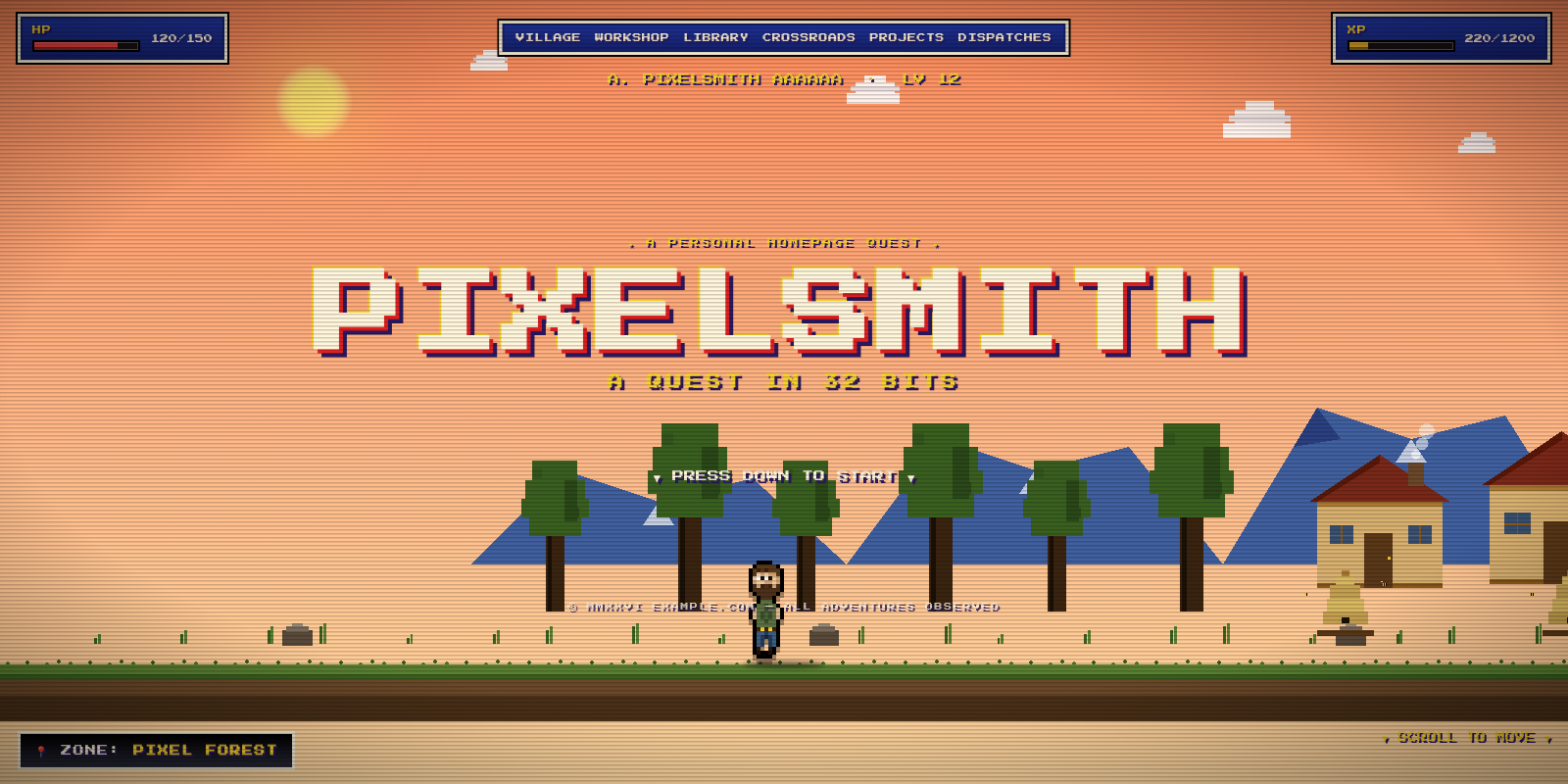
A side-scrolling 16/32-bit JRPG personal homepage, built as a content-driven Zola theme. The whole site is a single parallax "quest": a fixed pixel world, a walking sprite hero, an SNES-style HUD, and your content rendered as story dialogs, GOT ITEM! project cards, and quest-scroll blog dispatches.
The world/sprite engine and core styling are art-directed and fixed; everything a
site owner would want to change is plain text in config.toml and content/. The
files ship with demo content (a fictional developer, Alex Pixelsmith at
example.com) — replace it with your own.
▸ Live demo: https://brandonhon.github.io/press-start/

Requires Zola ≥ 0.19.
Add the theme to your site's themes/ directory:
cd themes
git clone https://github.com/brandonhon/press-start.git
# or, as a submodule:
# git submodule add https://github.com/brandonhon/press-start.git themes/press-start
Enable it at the top level of your config.toml (not under [extra]):
theme = "press-start"Then give it content. The quickest start is to copy this repo's demo as a template and edit it:
[extra] blocks and [[extra.*]] tables from this repo's config.tomlcontent/_index.md, content/projects/, and content/blog/static/favicon.svgThe theme provides templates/, sass/, and static/js/; you provide your own
content/ and config.toml. Override any theme file by creating the same path in
your own templates/ or static/ — see the
Zola theme docs.
This repository is itself a runnable demo site:
zola serve     # dev server with live reload at 127.0.0.1:1111
zola build     # static output to ./public
Before deploying your own site, set base_url in config.toml and replace the
demo content.
You configure (no template/CSS editing):
| Thing | Where |
|---|---|
Site title, description, base_url | config.toml |
| Favicon | config.toml [extra].favicon + static/ |
| Smooth scrolling (desktop) | config.toml [extra].smooth_scroll |
| CRT scanlines + vignette | config.toml [extra].crt |
| Under-construction holding page | config.toml [extra].under_construction |
| HUD text (name, level, HP/XP, labels, zone, scroll hint) | config.toml [extra.hud] |
| Menu items — labels and targets/anchors | config.toml [extra.menu] + content/_index.md anchors |
Card badges + READ/MIN + back-link labels | config.toml [extra.labels] |
| 404 / GAME OVER copy | config.toml [extra.notfound] |
| Contact signpost | config.toml [[extra.contact]] |
| Homepage title screen, story, dialogs, intros, end credits, per-section sky/zone/anchor | content/_index.md |
| Projects (cards) | content/projects/*.md |
| Dispatches (blog) | content/blog/*.md |
Theme-level (the art direction — edit the source if you want to retheme):
| Thing | Where |
|---|---|
| The pixel world (clouds, mountains, trees, houses) + hero sprite | static/js/quest.js (pixel-grid data) |
| Sky / time-of-day color palettes | static/js/quest.js (SKIES) |
| Color tokens, fonts, layout, CRT effect | sass/main.scss (:root + rules) |
| Project-icon pixel art | templates/macros/world.html (project_icon) |
Decorative glyphs (▼ ► 📍) | templates |
config.toml              # site + HUD + menu + badges + 404 + favicon + contact
content/
  _index.md              # the homepage "quest" — all narrative lives in [extra]
  projects/              # THE WORKSHOP — one file per "GOT ITEM!" card
  blog/                  # THE OLD LIBRARY — one file per quest-scroll dispatch
templates/
  base.html              # shared shell (world/HUD/menu/CRT); gates the construction page
  index.html             # the scrolling homepage, assembled from content
  section.html           # full /projects and /blog listings
  page.html              # a single dispatch, styled as a reading scroll
  404.html               # GAME OVER
  construction.html      # the under-construction holding page (when toggled on)
  macros/world.html      # project_icon() pixel-sprite macro
sass/main.scss           # all styling (prototype CSS + nav, reading view, responsive)
static/
  js/quest.js            # parallax, sprite animation, sky/zone, XP ramp, menu, blips
  js/construction.js     # the under-construction scene (hero hammering beehives)
  js/lenis.min.js        # vendored Lenis (only loaded when smooth_scroll is on)
  favicon.svg            # pixel-heart favicon (swap it for your own — see below)
theme.toml               # theme metadata
docs/index.html # the original standalone prototype (reference only)Every page sits inside a fixed chrome shell:
VILLAGE, WORKSHOP,
LIBRARY, CROSSROADS) plus the standalone PROJECTS (/projects) and
DISPATCHES (/blog) pages. Responsive:
MENU dropdown.[extra].smooth_scroll = true (default), desktop gets
inertial scrolling via Lenis so the
parallax glides like it does on a phone. It only activates for fine pointers and never
under prefers-reduced-motion, and the library is lazy-loaded — phones (already
inertial) never download it. Set it to false for plain native scrolling.[extra].crt = false to drop both (they're the heaviest paint cost, so it's worth
disabling on software-rendered browsers).config.toml [extra]HUD — every label and value:
[extra.hud]
name        = "A. PIXELSMITH"
level       = 12
level_label = "LV"
hp          = "120/150"
hp_pct      = 80           # HP bar fill (0–100)
hp_label    = "HP"
xp_label    = "XP"
xp_start    = 220          # XP counter start (ramps to xp_max on scroll)
xp_max      = 1200
start_zone  = "PIXEL FOREST"
zone_label  = "ZONE"
scroll_hint = "▼ SCROLL TO MOVE ▼"
Menu — label is the mobile toggle word; each [[extra.menu.items]] is a
button. Add, remove, and reorder freely. A target is one of:
target | goes to |
|---|---|
"#village" | an on-page anchor (must match a section's anchor — see below) |
"@/blog/_index.md" | an internal Zola page |
"https://…" | an external URL |
[extra.menu]
label = "MENU"

[[extra.menu.items]]
label  = "VILLAGE"
target = "#village"

[[extra.menu.items]]
label  = "PROJECTS"
target = "@/projects/_index.md"
Where anchors land: any homepage section can declare an anchor in
content/_index.md (e.g. anchor = "village"). Clicking a #village menu item
smooth-scrolls so that section's dialog box sits high in the sky — the houses
and the hero stay visible beneath it. (The landing offset is the
scroll-margin-top on .dialog, .story-box in sass/main.scss — bump it to land
boxes lower.)
Card badges + small affordances:
[extra.labels]
got_item        = "★ GOT ITEM!"     # project cards
quest_log       = "📜 QUEST LOG"     # blog scroll cards
crossroads      = "✦ CROSSROADS ✦"   # contact signpost
dispatch        = "📜 DISPATCH"       # single post reading view
read            = "▶ READ —"         # dispatch card read affordance
min             = "MIN"              # reading-time unit
back_to_section = "◄ BACK"           # a post → its section
back_to_home    = "◄ RETURN TO THE QUEST"   # a section → home
404 / GAME OVER screen:
[extra.notfound]
zone    = "THE VOID"
sky     = "night"
heading = "GAME OVER"
message = "This screen does not exist in the known world."
link    = "— PRESS START TO CONTINUE —"
Contact signpost — one entry per road (href is optional):
[[extra.contact]]
kind = "EMAIL"
who  = "hello @ example.com"
href = "mailto:hello@example.com"content/_index.mdThe title screen, story crawl, the about dialogs, the section intros, and the end
credits are all structured data under [extra]. Each story/dialog screen sets its
own zone and sky (dawn, morning, day, afternoon, dusk, night),
which drives the parallax sky transition as you scroll past it. Paragraph strings
may contain inline HTML (e.g. <em>). blog_count (default 3) controls how many
dispatches appear on the homepage.
The title screen:
[extra.title]
small     = "★ A PERSONAL HOMEPAGE QUEST ★"   # tiny line above
main      = "PIXELSMITH"                       # the large title word
sub       = "A QUEST IN 32 BITS"               # line below
press     = "▼ PRESS DOWN TO START ▼"
copyright = "© MMXXVI EXAMPLE.COM — ALL ADVENTURES OBSERVED"
main is the big word; it auto-scales to the viewport (clamp()), so it shrinks
on phones and caps out on desktop. One short word reads best (the display font is
wide). To change the min/max sizes, edit .title-screen h1 in sass/main.scss.
content/projects/<name>.md+++
title = "FORGE"
weight = 1 # controls card order
[extra]
icon = "ember" # ember | server | paper
status = "★ STATUS: ACTIVE ★"
+++
The card body. One short paragraph of Markdown.content/blog/<slug>.md+++
title = "ON WRITING HONEST CODE"
date = 2026-06-09
[extra]
volume = "VOL. I"
dispatch = "DISPATCH 06"
read_min = 11 # optional; falls back to Zola's reading_time
summary = "One-line teaser shown on the scroll card."
+++
Full post body in Markdown…The homepage shows the latest blog_count dispatches; the full list lives at
/blog. Clicking a scroll opens the dispatch in a readable panel that keeps the
world and HUD intact.
The theme ships a pixel-heart favicon at static/favicon.svg. To use your own,
either overwrite that file, or drop any image into static/ and point the config
at it:
[extra]
favicon = "favicon.svg"   # any file in static/ — "favicon.png", "icons/me.svg", …
It's a plain SVG of <rect>s on a 16×16 grid, so you can recolor or redraw it by
hand to match your palette.
Flip the whole site to a single no-scroll holding page — the pixel hero shuffling between three beehives, swinging a hammer (sparks, drifting bees, hazard tape):

[extra]
under_construction = true
uc_title   = "UNDER CONSTRUCTION"
uc_message = "This corner of the kingdom is being built. Mind the bees."
With it on, every URL serves the holding page (the quest, blog, and projects
are hidden until you flip it back to false). The scene is in
templates/construction.html + static/js/construction.js.
Icons are tiny inline pixel SVGs. Add a branch to the project_icon macro in
templates/macros/world.html and reference it via icon = "yourname" in a
project's front matter. (This is pixel art, so it lives in a template rather than
config.)
The look is intentionally art-directed, but it's all in two files:
:root custom properties at the top of sass/main.scss.SKIES object in static/js/quest.js (one entry per
time of day).MIT — see LICENSE.