
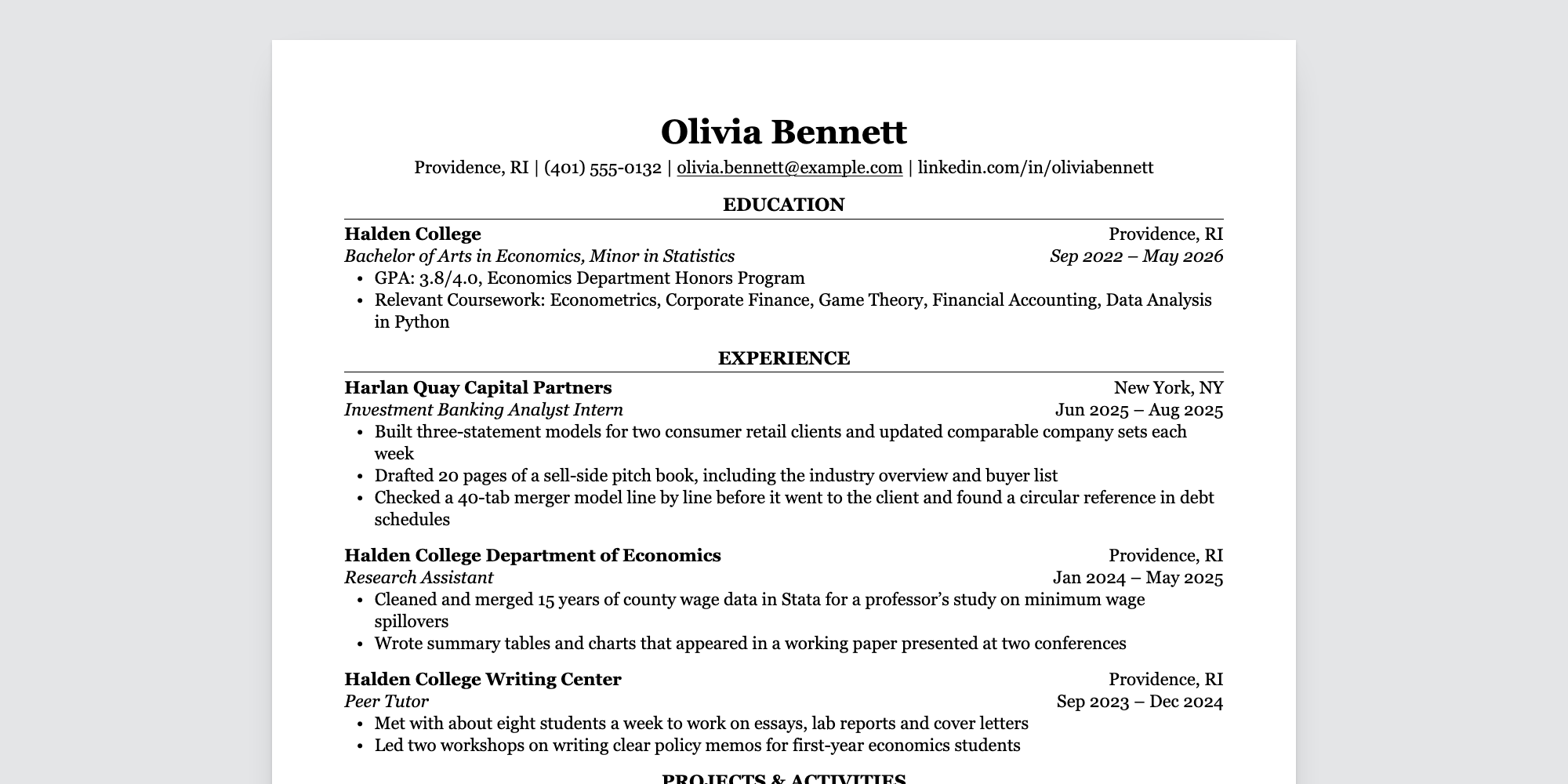
A one-page resume theme for Zola. You write your resume in the front matter of one Markdown file and get a web page that prints to a clean PDF: serif type, centered section headings over a thin rule, education first. The layout is the Classic template from ReadableResume, where the same design is available for Google Docs and Word.
Demo: https://readableresume.com/zola-resume-theme
Everything sits in one column with no tables, text boxes or icons, and the HTML follows reading order, so the text comes out of the PDF in the order you read it. That's the text applicant tracking systems parse.
The page is a single HTML file with the CSS inline. No JavaScript, no web fonts, nothing else to serve.
You need Zola 0.23.2 or later.
Start a site and add the theme as a git submodule:
zola init my-resume
cd my-resume
git init
git submodule add https://github.com/supertj/zola-readable-resume.git themes/readable-resume
cp themes/readable-resume/content/_index.md content/
zola init asks a few questions. The defaults are fine; the theme doesn't use
Sass or search.
Then open zola.toml. Add this line at the very top, above the first line in
square brackets (if it ends up under [extra], Zola won't see it):
theme = "readable-resume"and add these settings right below the [markdown] and [extra] lines that
are already in the file:
[markdown]
smart_punctuation = true
external_links_no_follow = true

[extra]
resume_paper = "letter"
Run zola serve and open http://127.0.0.1:1111. The page reloads every time you
save content/_index.md.
If you'd rather not use a submodule, clone this repository instead. It's a
working Zola site on its own, so you can edit content/_index.md in place and
build it.
Everything on the page comes from the front matter of content/_index.md,
between the two +++ lines. It's TOML, so text goes in quotes:
title = "Olivia Bennett"
description = "Resume of Olivia Bennett, an economics student at Halden College."

[extra]
contact = [
  "Providence, RI",
  "(401) 555-0132",
  "olivia.bennett@example.com",
  "linkedin.com/in/oliviabennett",
]

[[extra.sections]]
title = "Experience"

[[extra.sections.entries]]
company = "Harlan Quay Capital Partners"
location = "New York, NY"
title = "Investment Banking Analyst Intern"
date = "Jun 2025 – Aug 2025"
bullets = [
  "Built three-statement models for two consumer retail clients",
  "Drafted 20 pages of a sell-side pitch book",
]
title is your name. It goes at the top of the page and in the browser tab.
description sets the page's meta description, which search engines may show
in results if you put the page online.
Each [[extra.sections]] starts a new section, and sections print in the order
you write them. Section titles are set in capitals for you, so type them however
you like.
Each [[extra.sections.entries]] adds an entry to the section above it.
Whether the entry has a school, a company or a name decides its layout:
| Has | Fields | Layout |
|---|---|---|
school | school, location, degree, date | School and location on the first line, degree and dates in italics on the second. |
company | company, location, title, date | Company and location first, then the job title in italics with the dates. |
name | name, role, date | One line, "Name | Role" with the dates on the right. For clubs, volunteering and projects. |
The other fields are optional, and bullets works on all three. Leave a field
out and it just isn't printed.
A section can also have lines, one per line, which is how the skills section
works. A line with a label gets the label in bold, followed by a colon:
[[extra.sections]]
title = "Skills"
lines = [
  { label = "Technical", text = "Excel, PowerPoint, Python (pandas), Stata" },
  { label = "Languages", text = "French (fluent), Spanish (basic)" },
]
Or text, for a paragraph such as a short summary. Use triple quotes if it
runs over several lines:
[[extra.sections]]
title = "Summary"
text = "Economics graduate with two years of research experience in labor data."
Inline Markdown works in all of these: **bold**, *italic* and
[links](https://example.com).
In the contact line, email addresses and anything starting with https://
become links. To link shorter text, write the item as a table with a url:
contact = [
  "Providence, RI",
  { text = "github.com/oliviabennett", url = "https://github.com/oliviabennett" },
]
A url has to start with https://, http://, mailto: or tel:. The text
of a link like this, and your name in title, are printed as typed, without
Markdown.
A misspelled field name in a section, an entry or a contact item stops the build with a message saying which field and where, rather than quietly leaving something off your resume.
Open the page in Chrome or Edge, press Ctrl+P (Cmd+P on a Mac), choose Save as PDF, and untick Headers and footers under More settings. The paper size and margins come from the page itself.
Set resume_paper = "a4" in zola.toml for A4. The margins switch from 0.6 in
to 15 mm, the same as the Google Docs original.
Firefox and Safari print it too. Check that the paper size in their print dialog matches, since they don't always pick it up from the page.
All of these go in your zola.toml.
| Setting | Default | What it does |
|---|---|---|
resume_paper under [extra] | "letter" | "letter" or "a4". Sets the page size and margins for printing, and the size of the sheet on screen. |
smart_punctuation under [markdown] | false | Turns straight quotes and apostrophes into curly ones and -- into an en dash, like the original. |
external_links_no_follow under [markdown] | false | Adds rel="nofollow" to links to other sites. |
Links in the contact line follow the same [markdown] link settings as the
rest of the page, including external_links_target_blank,
external_links_no_referrer and external_links_class. Email and phone links
are left alone.
The theme has two templates:
templates/partials/style.html has all the CSS. Font sizes are in points so
the printed page matches the original.templates/index.html builds the page from the front matter.To change the styling, copy templates/partials/style.html into the same path
in your own site and edit it there. Zola uses your copy instead of the theme's.
To add something without copying the whole page, create templates/index.html
in your site, make it extend readable-resume/templates/index.html, and fill in
one of these blocks:
head: extra tags in <head>, such as another stylesheet. It holds the
theme's CSS, so call super() to keep it.before_resume and after_resume: content above or below the sheet. Hide
it in print with @media print if it shouldn't end up in the PDF.title: the text in the browser tab.The design uses Georgia, which comes with Windows and macOS, so there's nothing to install on those systems. Elsewhere, such as Linux or Android, the browser falls back to Gelasio if you have it installed (it's free on Google Fonts and drawn to Georgia's proportions), then to Times New Roman or the default serif. A different font can change the line breaks, so print from a computer that has Georgia if the page is close to full.
Set base_url in zola.toml to the address the site will live at, then run
zola build. The page ends up in public/index.html. With the default
settings Zola also writes robots.txt, sitemap.xml and 404.html there.
The page shows everything in your contact line, phone number included, so check that before you publish it.
MIT. The person, schools and companies in the sample are made up.