
A quiet, two-skin Zola theme. Two stylesheets ship together — a
Minima-flavoured typographic skin and a TUI/ncurses skin with an
ASCII-drawn article frame. Both ship with matched light and dark
modes, and two runtime toggles in the top-right flip between them
(skin + light/dark). Both choices persist to localStorage. Posts
with headings get a docs-style "on this page" TOC pinned under the
sidebar on the TUI skin, with scroll-spy for the active section.
No frameworks, no fonts hot-linked from a CDN, no analytics, no search, no comments. Static HTML out of Zola, two CSS files, two tiny inline scripts.
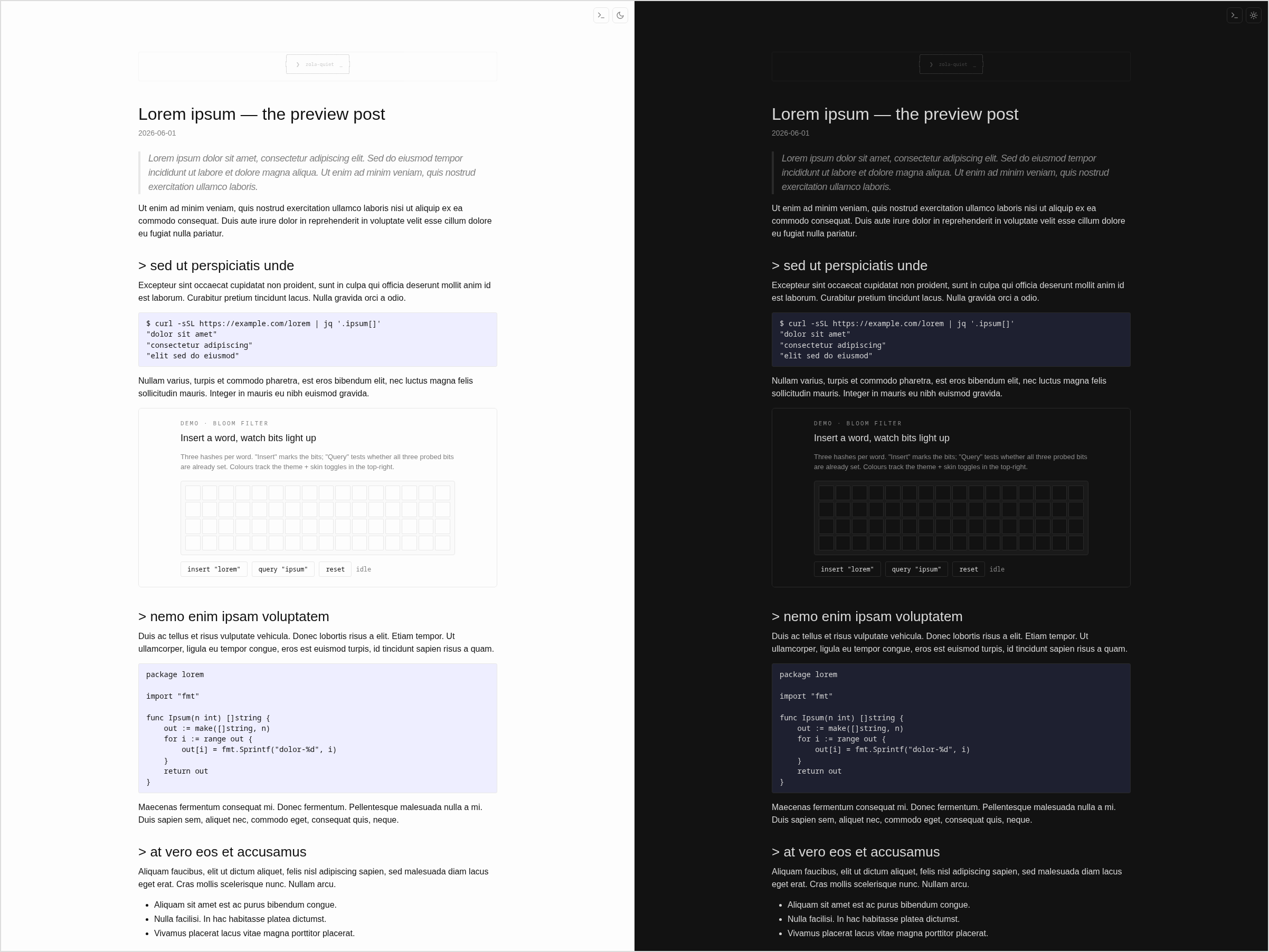
Each skin is shown with its light mode on the left and dark mode
on the right, rendered from the built-in lorem-preview sample
post via scripts/screenshots.sh.
Minima skin (the default):
TUI/ncurses skin with ASCII article frame and on-page TOC:

style.css is the default (Minima-flavoured — system sans,
~740 px column, weight-400 headings, blue links).
style-tui.css is the TUI/ncurses look (monospace everywhere,
ASCII article frame, -rw-r--r-- post list, sticky sidebar,
warm-paper light / near-black dark palette).<html>
before the stylesheet is fetched). Both skins define both
palettes; nothing to opt into.insert_anchor_links = "left" on a section
or page and posts with headings get a sticky "on this page" nav
pinned under the sidebar on the TUI skin. Scroll-spy highlights
the active heading.<div class="addendum"> for adding
dated extensions to posts after their original publish date.
Visible eyebrow, left rule, tinted background, dark-mode aware.{{/* xkcd(num=…, title=…, alt=…) */}} renders a
<figure class="xkcd"> with CC BY-NC 2.5 attribution./visualizers/_shared/ handle the theme-sync postMessage
protocol so any iframe wires up in a couple of lines instead of
hand-rolling the listener each time. See
Embedding a visualiser below.giallo-*.css files and flips them in
step with the toggle. See Syntax highlighting below.cd your-site
git submodule add https://github.com/johnnybravo-xyz/zola-quiet themes/zola-quietThen in your config.toml:
theme = "zola-quiet"[extra] keys the templates readAll optional. Every block is {%/* if */%}-guarded so the theme
degrades cleanly if a key isn't set.
| Key | Used by | Effect |
|---|---|---|
extra.author | <meta>, footer line | "© YEAR |
extra.github | index.html, footer | GitHub icon + connect link |
extra.linkedin | index.html, footer | LinkedIn icon + connect link |
extra.email | index.html, footer | Mail icon + connect link |
extra.ascii_signature | base.html sidebar | Multi-line ASCII shown as a quiet signature above the content |
extra.homepage_post_limit | index.html | Cap the front-page post list to N most recent posts. When more exist, a "see all M posts →" link appears below the list. Unset or 0 shows every post. |
Example:
[extra]
author = "Jane Doe"
github = "janedoe"
linkedin = "janedoe"
email = "jane@example.com"
ascii_signature = """
░░░░░░░░░░░░
░░ HELLO  ░░
░░░░░░░░░░░░
"""The theme ships an anchor-link.html override that renders as a
dim > character before the heading text. To enable, set
insert_anchor_links = "left" in a page's frontmatter (or the
section's _index.md, where it applies as a default to all pages
in the section):
insert_anchor_links = "left"Zola then inserts a <a class="header-anchor" href="#slug">></a>
before every h2/h3/etc. The CSS in static/style.css styles it
to look like a subtle prefix — dim by default, coloured on hover.
If a post embeds an interactive visualiser as an iframe, the theme
ships two small helpers under /visualizers/_shared/ so the plumbing
stays two <script> lines instead of a copy-pasted block.
On the post side, mark the iframe with data-viz-embed and give
it the height-message name the frame will post back:
<iframe src="/visualizers/foo.html"
        title="Foo visualiser"
        loading="lazy"
        style="width:100%;height:800px;border:1px solid var(--rule);
               border-radius:6px;"
        data-viz-embed
        data-height-msg="foo-height"></iframe>
<script src="/visualizers/_shared/viz-embed.js" defer></script>
viz-embed.js finds every iframe[data-viz-embed] on the page, sends
{theme, skin} to it on load and whenever the parent's data-theme or
data-skin change, and resizes the iframe when the frame posts a
height back.
Inside the visualiser HTML, load the frame-side helper (plus the optional TUI palette so the viz tracks the skin toggle):
<link rel="stylesheet" href="/visualizers/_shared/viz-tui.css">
<script src="/visualizers/_shared/viz-frame.js"
        data-height-msg="foo-height"
        data-size-selector=".wrap"
        defer></script>
viz-frame.js mirrors data-theme / data-skin onto the frame's own
<html> when it receives them, and posts the .wrap element's height
back to the parent (change the selector via data-size-selector).
Omit data-height-msg to skip height reporting entirely.
viz-tui.css sets base CSS variables (--bg, --panel, --text,
--mark, --match, --danger, etc.) for TUI light + dark. Each
visualiser stays free to add its own semantic aliases (e.g. --go: var(--mark);) — the file only overrides when data-skin="tui" is on
the frame root.
The theme is wired for Zola 0.22+ class-mode syntax highlighting,
but doesn't enable it for you — you opt in from your site's
config.toml. When you do, the base template loads two CSS files
(/giallo-light.css and /giallo-dark.css) with media-query
gating, and the theme toggle flips them in step with the light/dark
toggle.
To enable, add this to your site's config.toml:
[markdown.highlighting]
style = "class"
light_theme = "github-light"
dark_theme = "github-dark"
Zola emits the two CSS files automatically on the next build. The
filenames (giallo-light.css and giallo-dark.css) are fixed by
Zola — don't rename them; the theme's <link> tags expect those
exact paths.
The theme names come from
shikijs/textmate-grammars-themes
(VSCode-flavoured TextMate themes that Zola 0.22+ bundles via the
giallo highlighter). Any matched light/dark pair works — common
choices are github-light/github-dark, one-light/one-dark-pro,
ayu-light/ayu-dark, everforest-light/everforest-dark.
If you'd rather not have syntax highlighting, simply omit the
[markdown.highlighting] block; the <link> tags will 404 on
those two files but the rest of the site is unaffected. (Or fork
the base template and drop the two lines.)
Drop a file with the same name into your site's templates/ to
override the theme's. The theme ships:
base.html — page chrome, toggles, controls, footerindex.html — homepage (post list + connect block)section.html — post list pages (e.g. /posts/)page.html — individual posts with date + tag chipstaxonomy_list.html — /tags/taxonomy_single.html — /tags/foo/shortcodes/xkcd.html — comic embed shortcodeUseful classes the stylesheets style:
pre.whoami — borderless monospace block, no background; good for
a $ whoami opener on the homepage..post-list — un-bulleted post list with <time> prefix..tag-chip — rounded pill rendered for each tag.figure.xkcd — bordered comic figure with attribution caption.details.viz — collapsible visualiser embed: a <details> whose
<summary> is the toggle and whose body is the iframe. Add open
to start expanded..addendum, .addendum-eyebrow — the dated-extension block..controls, .skin-toggle, .theme-toggle — top-right toggle pair.git clone https://github.com/johnnybravo-xyz/zola-quiet
cd zola-quiet
zola serveconfig.toml at the repo root is a minimal demo configuration
that's only used when building this repo in isolation.
MIT — see LICENSE.